Open source · $10 a month · Uses the official Google Business Profile API
Google Business Profile management where nothing goes live without approval
An affordable local SEO tool for small businesses and agencies. Connect Claude or any MCP client, or use built-in AI drafts. Reviews, posts, rank tracking and reports for $10 a month per account, and the $10 is usage credit. Rules check every reply, post and profile edit first, and you choose how much your agent can do.
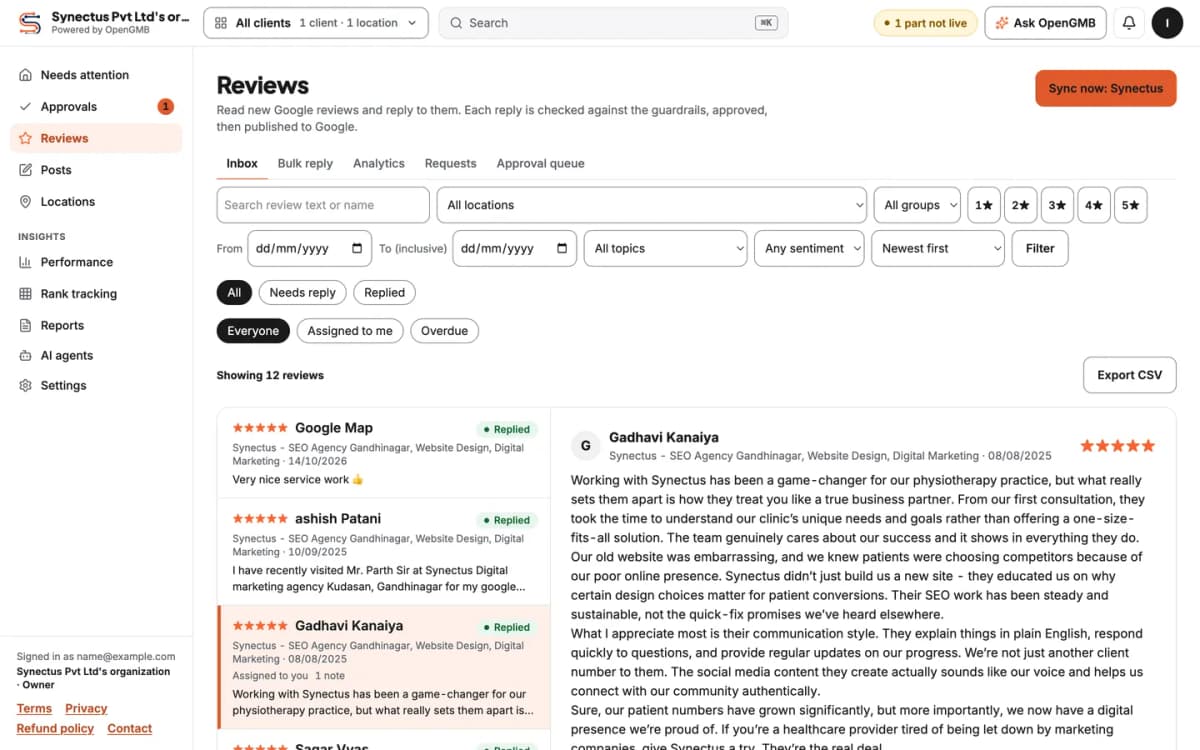
Connect Claude to your Google Business Profiles
OpenGMB runs a Google Business Profile MCP server at https://opengmb.synectus.com/mcp. One command adds it to Claude Code. Claude Desktop, ChatGPT and Cursor connect the same way, with a token.
- Claude
- ChatGPT
- Cursor
- Claude Code
Sample session
$ claude mcp add --transport http opengmb https://opengmb.synectus.com/mcp --header "Authorization: Bearer <token>"Added HTTP MCP server opengmb> Which reviews from the last 7 days have no reply yet?● opengmb.reviews_list(replied=false, from=<7 days ago>, limit=20)location rating age status Main Street 2 stars 2d unreplied Main Street 5 stars 3d unreplied Eastside 4 stars 6d unreplied > Draft a reply to each. Keep them for me to approve.● opengmb.reviewReplies_createDraft(x3)● opengmb.reviewReplies_submit(x3)3 replies waiting for approval in the approvals inbox.Nothing was sent to Google.
Tokens can be read-only or read and write, and you can revoke one at any time. A reply Claude writes goes through the same rules as one you type. You choose how much your agent can do.
Or let built-in AI draft replies and posts
No agent setup needed. OpenGMB can write a first draft for you to edit. Drafts are charged at our cost plus 28%, drawn from your monthly credit.
Reply drafts
A first reply for each new review, written in your tone and checked against the rules.
Post ideas
Topics and short drafts for your next Google posts, ready to edit and schedule.
Profile descriptions
A description draft that stays inside Google's 750 character limit and has no links.
Approval and guardrails: rules check every draft before anyone approves it
Every reply, post and profile edit is checked against rules before it can be approved. If a rule blocks it, the Approve button is gone until someone fixes the text.
- Step 1
A draft arrives
From you, a teammate, Claude over MCP or the built-in AI. It waits in the approvals inbox, not on Google.
- Step 2
Rules check the text
A link, an email address or impossible hours get blocked, and the rule id is shown.
- Step 3
An approval publishes it
Only a clean draft can be approved. Then it publishes, and the audit log keeps the name.
U7.urlBlocks a reply or post that contains a URL or web address.U7.emailBlocks an email address in a reply, post or description.PR.description-lengthBlocks a profile description over 750 characters.PR.hours-validBlocks opening hours that cannot be real, like a close before an open.PR.phone-formatBlocks a phone number that is not in a valid format.
Review reply for a plumbing company
Blocked
Thank you for the kind words! Book your next tune-up at example.com/book and mention this review.
U7.url (blocks publishing) The reply contains a URL or web address.
Rules come in packs: general, healthcare and legal. The healthcare pack blocks a reply that confirms someone was a patient.
There is one reply exception, and the owner has to turn it on: an optional rule that auto-approves replies to 4- or 5-star reviews. It is off until you switch it on, and replies to 1 to 3 star reviews always need a person.
What is Google Business Profile management?
Google Business Profile management is the ongoing work of keeping a business's Google listing accurate and active. That means replying to reviews, publishing posts, fixing hours, categories and services, and watching the calls, direction requests and website clicks the listing brings in.
The listing is what shows up when someone searches for a plumber near them, next to your reviews, your hours and a call button. If the hours are wrong or a review has sat unanswered for three weeks, people notice before they reach your website.
Management software puts that weekly work in one place. OpenGMB adds two things: approval before posts, profile edits and replies reach Google, and rules that check the text first.
How Google Business Profile management works in OpenGMB
Setup takes one sign-in. After that, the work is reading drafts and pressing approve.
- Step 1
Connect Google with the official API
Sign in with the Google account that manages the profiles and approve access. There is no scraping and no shared login.
- Step 2
Import your locations
Pick the locations to bring in. Reviews, posts and profile details load, and the health check runs on each one.
- Step 3
Drafts arrive from you, Claude or built-in AI
A reply or post can come from you, a teammate, Claude over MCP or the built-in AI. It lands in the approvals inbox, not on Google.
- Step 4
Approve it and it publishes
Rules check the text first, and a failure stays blocked with the rule id shown. Once a clean draft is approved, it publishes and the audit log records who did it.
Reviews, posts, profile health and performance in one place
Every screenshot is the production app on Synectus's own profile.
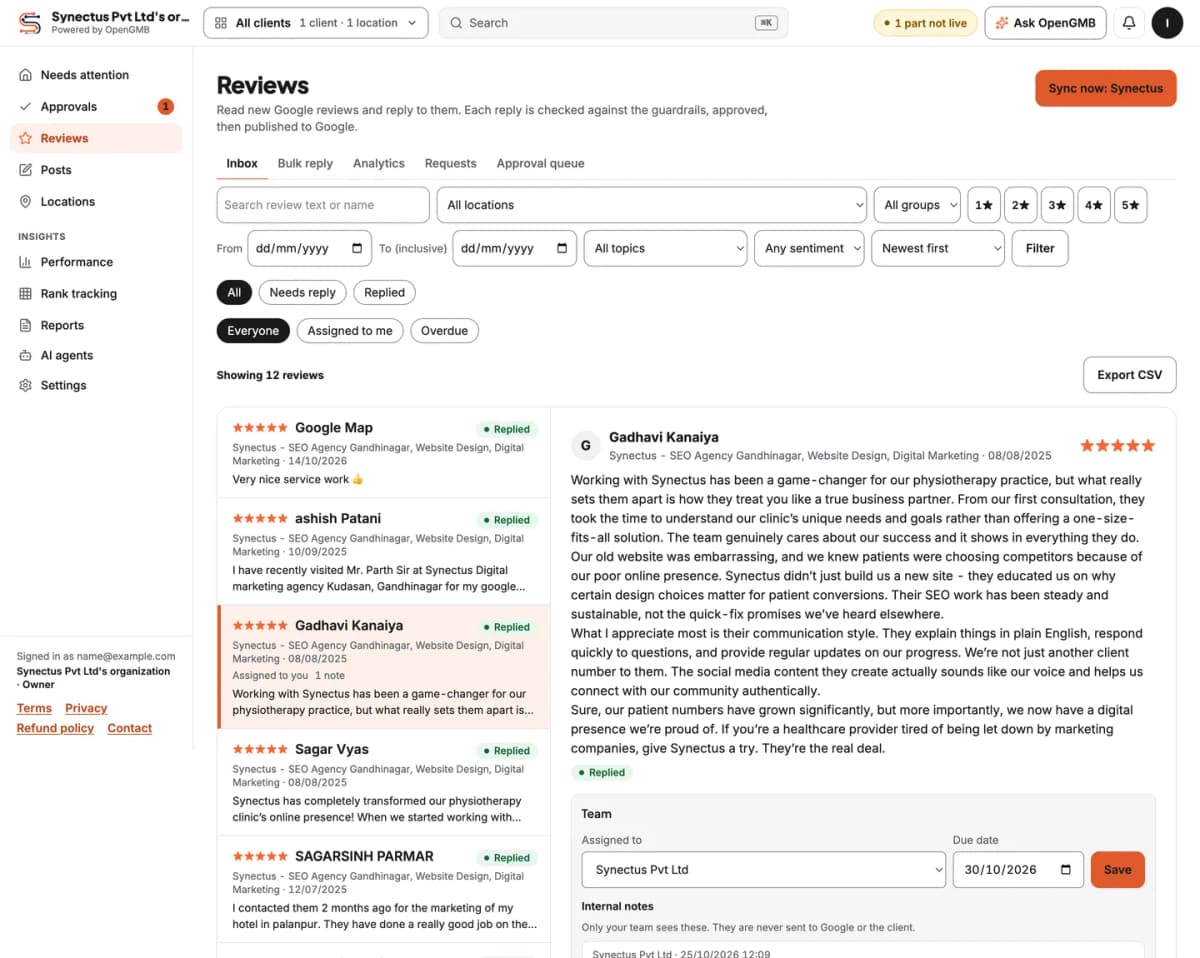
Reply to Google reviews from one inbox
Every review from every location lands in one list. Open one, assign it to a teammate, leave an internal note, and write the reply. Or let a draft appear first and edit it.
- New reviews sync every 2 hours, and replies made directly in Google are picked up too.
- A reply that contains a link is blocked by rule U7.url before it can be approved.
- Review requests come as email campaigns, a link, a QR code or a website widget.
Google review management softwareReview request links and QR codes
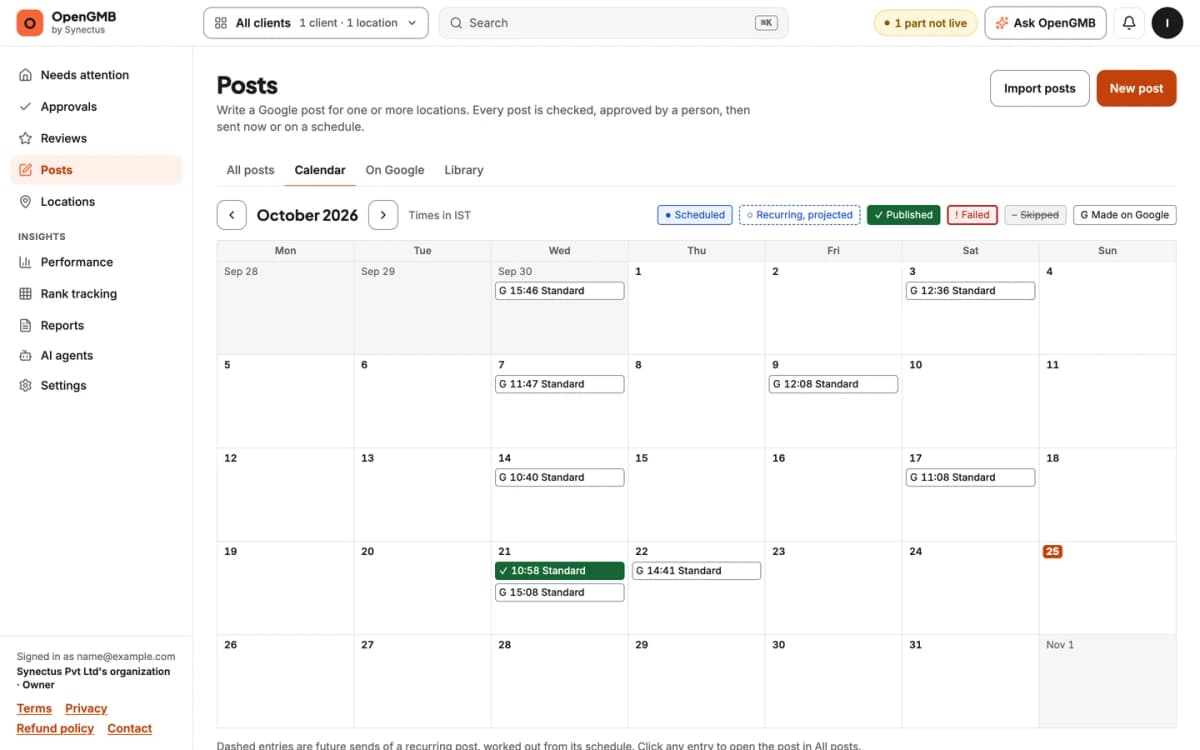
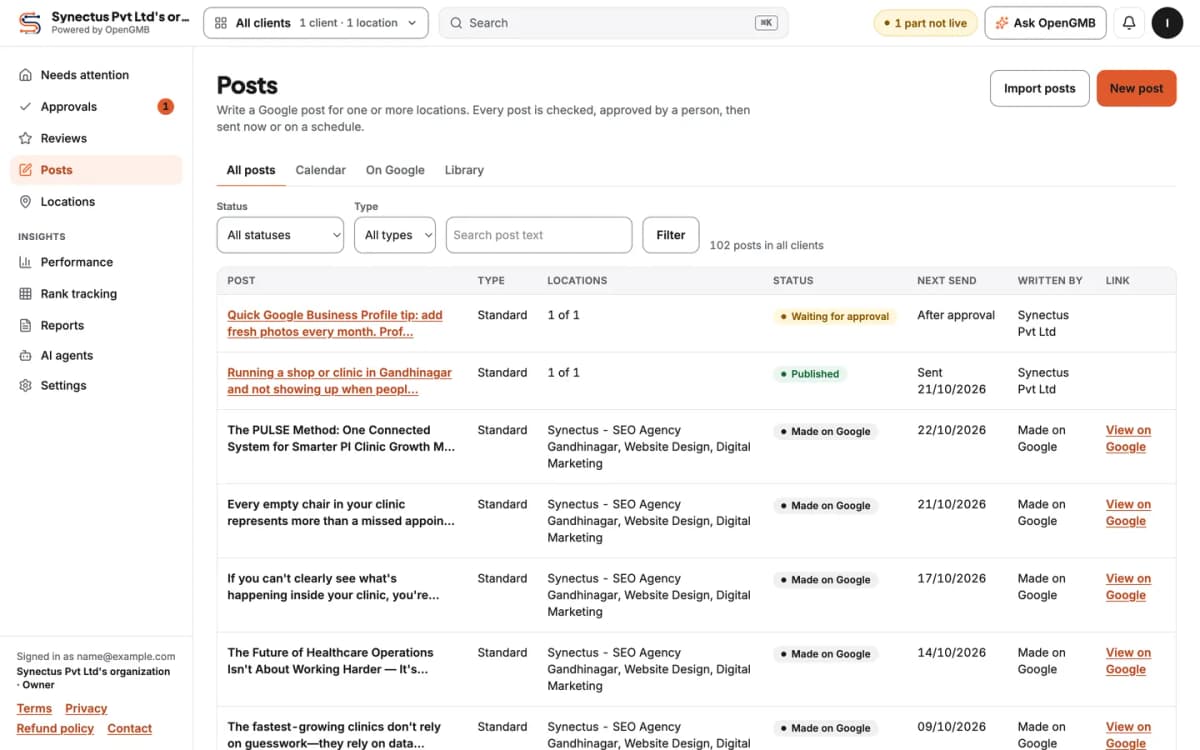
Schedule Google Business Profile posts on a calendar
The post calendar shows what is scheduled and what already went out, month by month. The Posts list adds each post's status and next send time.
- Posts that contain an email address are blocked by rule U7.email.
Google Business Profile posts and scheduling
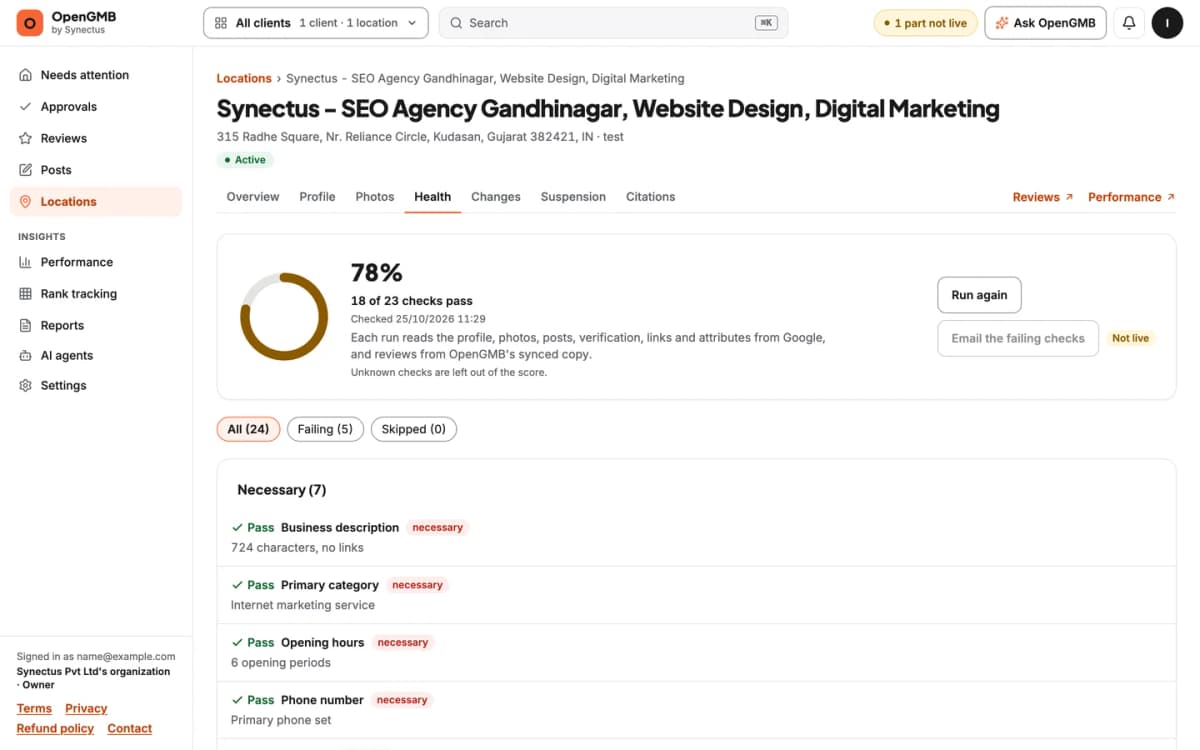
Edit your Business Profile and see how healthy it is
The health check grades each check on a location as necessary, important or nice to have. Every failing check comes with a link to fix it.
- Descriptions over 750 characters are blocked by rule PR.description-length.
- Impossible hours fail PR.hours-valid, and a malformed number fails PR.phone-format.
Edit and monitor Google Business Profiles
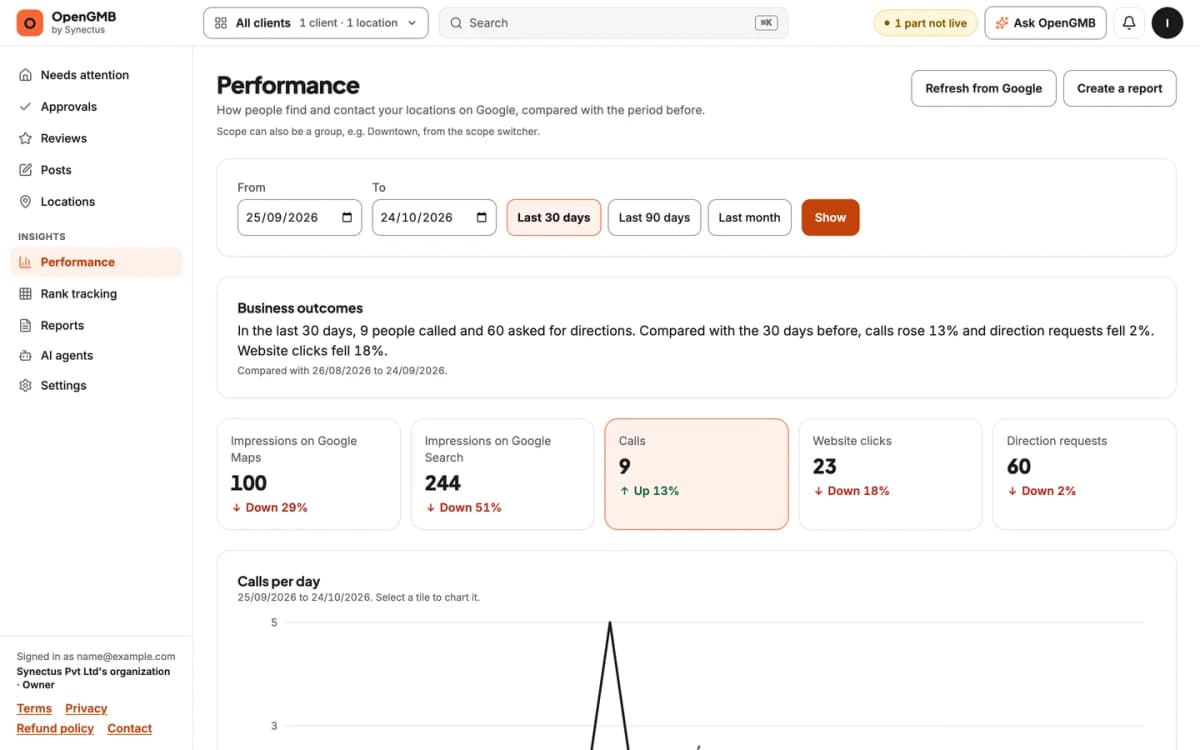
Track calls, directions and website clicks
The Performance page opens with a plain sentence about business outcomes, then the tiles: calls, direction requests, website clicks and impressions. It keeps 18 months of history, which is as far back as Google serves daily numbers.
Reports carry your branding and share as a link. Rank tracking adds a Google Maps geo-grid, 3x3 to 13x13 points. Right now the grid shows labeled sample data while we connect the live data provider.
Google Business Profile insights and reportsLocal rank tracker with a geo-grid
Google Business Profile management for home services businesses
A plumber, an HVAC company, an electrician or a pest control crew gets most of its calls from the map results. You drive to the customer, so the profile is the shop window.
- Service areas. Edit the cities and zip codes you cover, across many locations in one bulk edit.
- Review requests after a job. Email a campaign, send a link, put a QR code on the invoice, or add a widget to your site.
- Posts for seasonal offers. Schedule furnace tune-ups for September, then check the calendar for gaps.
- Calls and direction requests, month by month, for up to 18 months.
- Profile changes Google made. Get alerted when hours, a phone number or a category changes.
- Clean replies. A reply can't carry a link or an email address, even at 9 PM after a long job.
Roofers and cleaners work the same way. Start with the guide to Google Business Profile management.
White label Google Business Profile reporting for agencies
You run profiles for clients and need them to see the work without handing them the keys. OpenGMB gives each client a portal under your brand.
Client portal
Clients approve replies and posts themselves and see their results.
White label reports
Reports and the portal carry your branding, and a report shares as a link.
Bulk edits
Change hours, categories and attributes across many locations at once, still with approval.
One price per account
Adding a location does not change the bill. The $10 covers the account.
The math for an agency with 10 locations
The price is per account, so 10 locations cost $10.00 a month, or $1.00 a location. A tool that charged $10 for each location would cost $100.00 for the same 10.
OpenGMB vs typical Google Business Profile tools
"Typical tools" describes common patterns, not one vendor. Check any vendor's current terms before you decide.
| What you compare | Typical tools | OpenGMB |
|---|---|---|
| Price model | Often per location or per seat, billed monthly. | $10 a month per account, and the $10 is usage credit. |
| Approval before publishing | Often optional, or not offered. | Posts, profile edits and replies wait for approval. The one reply exception is auto-approve for 4- or 5-star reviews, which the owner has to turn on. |
| Guardrails | Usually none, or a spell check. | Rule packs block links, emails and more, by rule id. |
| MCP | Some vendors list one, often on a higher plan or in beta. | Public MCP server at opengmb.synectus.com/mcp, included on the $10 plan. You choose how much your agent can do. |
| Client portal | Often on a higher tier. | Included. Clients approve work and see results. |
| White label | Often on a higher tier. | Included. Your branding on reports and the portal. |
| Google API | Varies. Ask how the tool connects. | The official Google Business Profile API, with your sign-in. |
| Open source | Often closed source. | An open-source core. The community edition is on GitHub. |
| Self-host option | Rarely offered. | Yes. The community edition runs on your server with one owner login and your own Google and AI keys. |
An open-source core you can run yourself
The community edition of OpenGMB is public on GitHub. It has one owner login, manages as many clients and locations as you need, and uses your own keys. The hosted plan for $10 a month adds teams and roles, a client portal, billing and custom domains.
License: MIT
Read the code
The community edition is on GitHub, with the rule packs and the approval flow included. If you wonder what the app does with your Google account, you can check.
Run it yourself
The community edition has one owner login and manages as many clients and locations as you need, with your own Google and AI keys. You handle hosting and updates.
Or use the hosted plan
$10 a month per account, and the $10 is usage credit. It adds teams and roles, a client portal, billing and custom domains. We run the servers, the Google connection and the updates.
$10 a month, and the $10 is usage credit
OpenGMB is an affordable local SEO tool for small businesses and agencies. As of 2026-10-24, it costs $10 a month per account, however many locations it holds. The $10 is credit you spend on AI drafts and rank scans, both at our cost plus 28%. Google Business Profile calls are free, with a fair-use limit. New accounts get a 14-day trial with $0.50 of credit and no card.
Shopping for cheap SEO tools? Per-location billing is where the bill climbs as you add clients. Here 10 locations cost the same $10 as one.
$10 a month per account
Includes $10 usage credit each month.
Starts with $0.50 free credit, no card.
What the credit pays for
- Google Business Profile calls (publish, edit, refresh, import, sync)
- Free (fair use)
- Reading synced data (reviews, performance, history)
- Free
- AI drafts (Claude Haiku 5.5)
- Our cost plus 28%
- Rank scans (one keyword, one grid point)
- Our cost plus 28%
- Top-up credit
- Prepaid
Example: a single-location plumber
Assume 20 replies, 8 posts and 2 opening-hours edits in a month, plus 20 manual refreshes. All of that is Google work, so it is free. The bill is $10.00, with $10.00 of credit left for AI drafts and rank scans.
Example: an agency with 10 locations
Assume a similar month of Google work at each of the 10 locations. That is still free. The bill is $10.00 for the account, which comes to $1.00 per location, with $10.00 of credit left for AI drafts and rank scans.
You can also run the community edition on your own server with your own keys, and handle the hosting and updates yourself. Read the self-hosting docs.
Built by Synectus, an agency that runs Business Profiles
Synectus is the agency behind OpenGMB. Synectus has managed Google Business Profiles for its own clients for years. We built OpenGMB because the tools we tried either published whatever we typed or charged per location.
Every screenshot on this page comes from our own account, so what you see is what you get. Read more about Synectus and OpenGMB.
Everything you can manage
Reviews
One inbox for every location, with assignees and internal notes.
Review requests
Email campaigns, a link, a QR code or a website widget.
Posts
A calendar, scheduling, and the status of every post.
Profile management
Edit hours, categories and services, and see a health score for each location.
Rank tracking
A Google Maps geo-grid from 3x3 to 13x13, on sample data for now.
Performance and reports
Calls, directions and website clicks, with 18 months of history.
Client portal
Clients approve work and see results under your brand.
Guardrails
Rule packs block links, emails and impossible hours before approval.
Google Business Profile MCP
Connect Claude or any MCP client with a token.
Questions about Google Business Profile management
How do I reply to Google reviews from one place?
Connect your Google account, import your locations and open Reviews. Every review is in one inbox. Open one, write a reply or edit a draft, and approve it. A reply with a link is blocked by U7.url until you remove it.
Can I schedule Google Business Profile posts?
Yes. Write a post, pick a date and approve it. It sits on the post calendar and publishes at the scheduled time.
What is a geo-grid rank tracker?
A geo-grid rank tracker checks where your business shows up on Google Maps from a grid of points around a location, not from one spot. OpenGMB supports grids from 3x3 to 13x13, with a radius from 100 m to 50 km. Today the grid shows sample data while we connect the live data provider.
Is it the official Google API?
Yes. OpenGMB connects through the official Google Business Profile API, with your own Google sign-in and permission. It does not scrape Google.
What does it cost?
As of 2026-10-24, it costs $10 a month per account, and the $10 is usage credit. Google Business Profile work is free, with a fair-use limit on each account. Credit pays for AI drafts and rank scans, both at our cost plus 28%. New accounts get a 14-day trial with $0.50 of credit and no card.
Is OpenGMB open source?
Partly. OpenGMB has an open-source core: the community edition is public on GitHub, and you can read it or run it yourself. The hosted plan adds teams and roles, a client portal, billing and custom domains.
Can I self-host OpenGMB?
Yes. The community edition runs on your server with one owner login, as many clients and locations as you manage, and your own Google and AI keys. You run the server and the updates yourself. If you would rather not, use the hosted plan.
Can I connect Claude?
Yes. Add the MCP server at https://opengmb.synectus.com/mcp to Claude Code with one command, or connect Claude Desktop, ChatGPT or Cursor with a token. You choose how much your agent can do.
Can anything publish without approval?
Posts and profile edits wait for approval. For replies there is one optional rule, and the owner has to turn it on: auto-approve for 4- or 5-star reviews. Replies to 1 to 3 star reviews always need a person, and the audit log records who approved each change.
Do you support multiple locations?
Yes. Import every location the Google account can see, group them and run bulk edits. The price is per account, so ten locations cost the same $10 a month as one.
Want the free tool first? Try the Google review link generator, with a QR code on the same page.
Try it on one profile first.
$0.50 free credit, no card. Rules check every draft before anyone approves it.